An Adventure into Java Out of Memory Error: Part 2
An Adventure into Java Out of Memory Error: Part 2
Preamble
In the first part of this series, we addressed an OutOfMemoryError caused by the exhaustion of physical memory. We implemented solutions and hoped the problem was resolved. However, as is often the case in software development, issues can be more complex than they initially appear. Despite our efforts, the OutOfMemoryError reared its head again. It became clear that a deeper investigation into the root cause was necessary.
Investigation, Once More!
When we revisited the problem, our first stop was to examine the AWS CloudWatch Metrics. The Memory Used metric exhibited a troubling pattern: memory usage increased linearly over time until it reached the maximum, after which it suddenly dropped to a lower level:
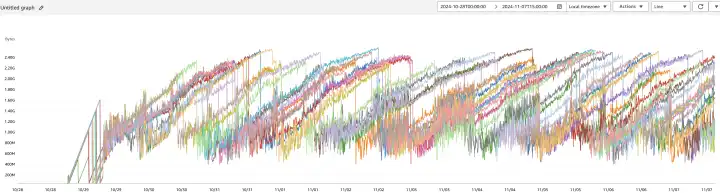
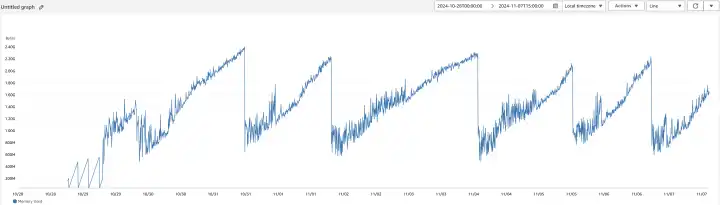
These abrupt drops in memory usage corresponded with our Tomcat server restarting, indicating that the application was crashing due to memory exhaustion. Given that our business logic did not involve operations that could continuously consume memory, we suspected a memory leak. To confirm our suspicions and identify the culprit, we decided to take a closer look using the Java heap dump.
Analyzing the Java Heap Dump hprof
A heap dump is a snapshot of the JVM's memory at a specific point in time. It contains detailed information about the objects and classes in the heap, including references and object sizes. Analyzing a heap dump allows us to see exactly what's occupying memory and can help identify memory leaks or inefficient memory usage. The heap dump is typically saved in a binary .hprof format, which can be analyzed with various tools designed for profiling and debugging.
JVM Options for Heap Dumps
To capture a heap dump automatically when an OutOfMemoryError occurs, we enabled the following JVM options:
-XX:+HeapDumpOnOutOfMemoryError: Instructs the JVM to generate a heap dump when anOutOfMemoryErroris thrown.-XX:HeapDumpPath=/path/to/heapdump: Specifies the directory where the heap dump file should be saved.
Eclipse Memory Analyzer Tool (MAT)
For analyzing the heap dump, we used the Eclipse Memory Analyzer Tool (MAT). MAT is a powerful, open-source Java heap analyzer designed to help developers and system administrators diagnose memory leaks and optimize memory consumption in Java applications. It provides in-depth analysis of Java heap dumps, enabling us to identify memory leaks, reduce memory footprint, and improve application performance.
Diving Deep into the Heap Dump with MAT
Leak Suspects Report
After importing the heap dump file java_pid4985.hprof into MAT, we generated the Leak Suspects Report. This report highlights potential memory leaks and inefficient memory usage patterns in our application.
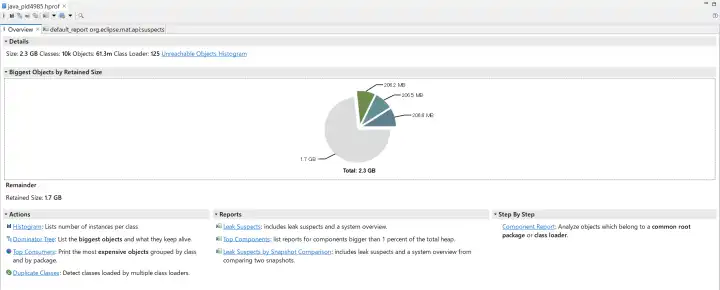
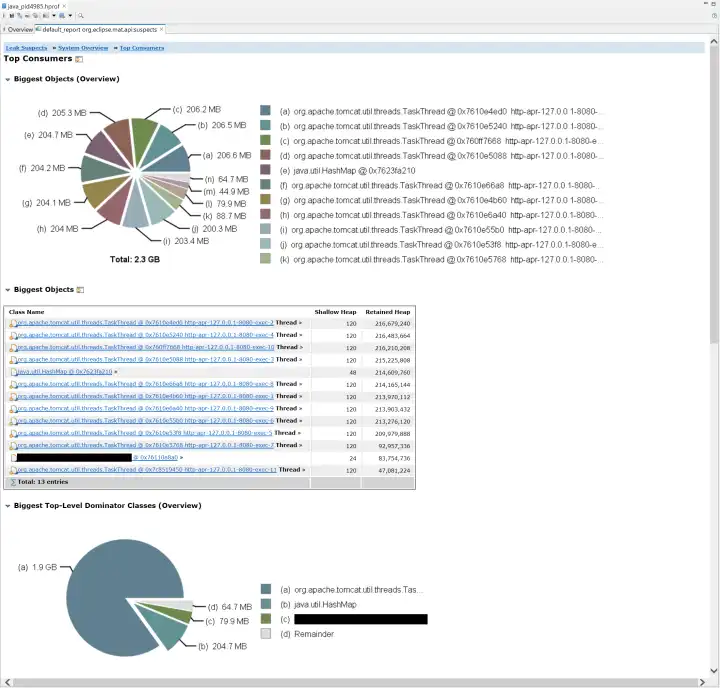
In our case, the report identified instances of TaskThread as significant memory retainers, holding approximately 1.9 GB of memory. This significant retention indicated that TaskThread was a primary contributor to the memory leak. To gain further insights, we delved deeper into the dominator tree.
Dominator Tree
The Dominator Tree provides a hierarchical view of object retention, showing which objects are preventing others from being garbage collected. It's instrumental in identifying memory leaks and understanding memory consumption patterns.
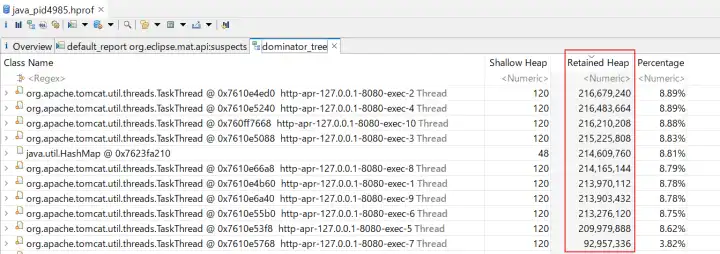
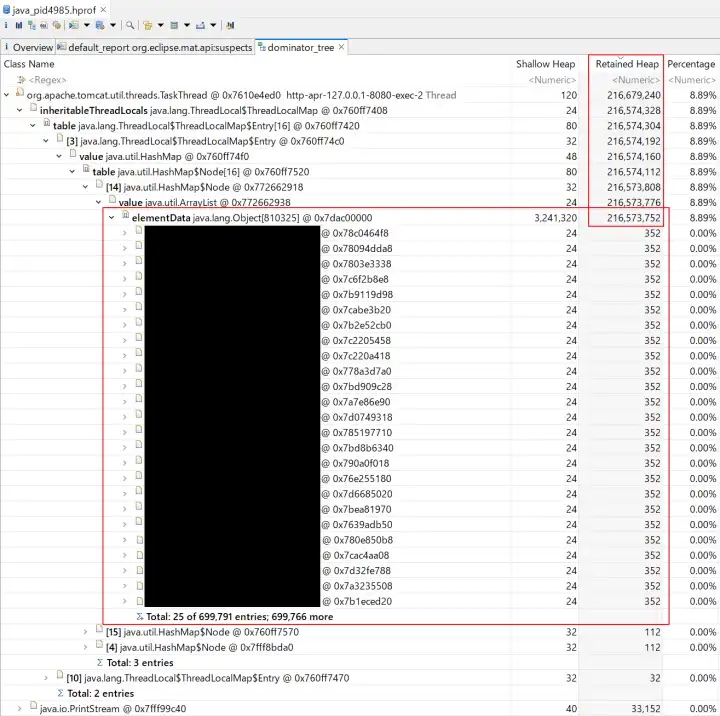
Within the Dominator Tree, we noticed that each TaskThread had an InheritableThreadLocal containing an ArrayList with 699791 entries. These entries were instances of a class we'll refer to as LogRecord.
The presence of such a large collection of LogRecord objects indicated that they were being accumulated over time without being released, leading to our memory leak.
The Root Cause in Code
Armed with this information, we examined our codebase to find where these LogRecord instances were being managed. The actual project code is intricate, so I'll present a simplified version to give a clear and straightforward explanation.
We had a globally accessible singleton containing an InheritableThreadLocal property used to store LogRecord objects for each request:
private static final InheritableThreadLocal<Map<Class<?>, List<LogRecord<?>>>> LOG_RECORD_STORE = new InheritableThreadLocal<>() {
    @Override
    protected Map<Class<?>, List<LogRecord<?>>> initialValue() {
        return new HashMap<>();
    }
};
When adding a new LogRecord, the following code was executed:
var logRecordStore = LOG_RECORD_STORE.get();
var records = logRecordStore.get(RequestFoo.class);
if (records != null) {
    records.add(new LogRecord());
}
Additionally, we had a class implementing the ServletRequestListener interface to collect request handling information during initialization and execution stages, and to output all collected information to logs upon request completion:
public class RequestLogRecorder implements ServletRequestListener {

    @Override
    public void requestInitialized(ServletRequestEvent sre) {
        // Initialize and add LogRecord data to the corresponding List<LogRecord<?>>
        // ...
    }

    @Override
    public void requestDestroyed(ServletRequestEvent sre) {
        // Output all LogRecord data to logs
        // ...
    }
}
An Explanation of InheritableThreadLocal and Tomcat
To fully grasp the root cause of the memory leak and how to prevent similar issues, it's essential to understand how InheritableThreadLocal works in Java, especially in the context of multi-threaded applications like those running on Tomcat.
InheritableThreadLocal
InheritableThreadLocal is a subclass of ThreadLocal that allows child threads to inherit values from their parent thread. When a new thread is created, it receives initial values for all inheritable thread-local variables from the parent thread. This feature is particularly useful when you want to maintain context across threads without explicitly passing it.
Tomcat
Tomcat uses a thread pool to handle incoming HTTP requests efficiently. Threads in this pool are reused to serve multiple requests over time. When an InheritableThreadLocal variable is set in one of these threads, its value can persist across different requests, either intentionally or unintentionally. This persistence can lead to unexpected behavior if the thread-local variables are not properly managed.
Our Situation
In our case, the problem stemmed from the fact that a former developer used an InheritableThreadLocal to store LogRecord objects for each request but did not properly clear them after the request completed. Since Tomcat reuses threads from its pool, the InheritableThreadLocal variable LOG_RECORD_STORE and its data persisted across multiple requests. As a result, these LogRecord objects remained in memory. Consequently, as the application processed more requests, the ArrayList within the InheritableThreadLocal grew indefinitely, consuming more and more memory until the JVM ran out of space. This gradual increase in memory consumption eventually triggered an OutOfMemoryError.
The Solution
To fix the memory leak, we needed to ensure that all LogRecord entries were cleared once they were no longer needed. We updated the requestDestroyed method in our RequestLogRecorder class as follows:
@Override
public void requestDestroyed(ServletRequestEvent sre) {
    // Output all LogRecord data to logs
    // ...

    // Clear the processed LogRecord entries to prevent memory leaks    var logRecordStore = LOG_RECORD_STORE.get();    if (logRecordStore.containsKey(RequestFoo.class)) {        logRecordStore.remove(RequestFoo.class);    }}
By removing the entries associated with the completed request, we allowed the garbage collector to reclaim the memory used by those LogRecord objects. This change prevented the ArrayList from growing indefinitely and consuming more memory over time.
Furthermore, if the entire InheritableThreadLocal was no longer needed, we could remove it completely:
@Override
public void requestDestroyed(ServletRequestEvent sre) {
    // Output all LogRecord data to logs
    // ...

    // Clear the processed LogRecord entries to prevent memory leaks
    var logRecordStore = LOG_RECORD_STORE.get();
    if (logRecordStore.containsKey(RequestFoo.class)) {
        logRecordStore.remove(RequestFoo.class);
    }

    // Remove the ThreadLocal variable if it's empty    if (logRecordStore.isEmpty()) {        LOG_RECORD_STORE.remove();    }}
This would clear all data associated with the thread-local variable. However, since Tomcat maintains a thread pool and may reuse threads, keeping the variable can avoid the overhead of reinitializing it by invoking its initialValue() method each time a thread is reused. Therefore, we chose to use the former version.
After the Fix
After deploying the updated code, we monitored the application's memory usage to verify that the issue was resolved. The comparison below clearly illustrates the improvement:
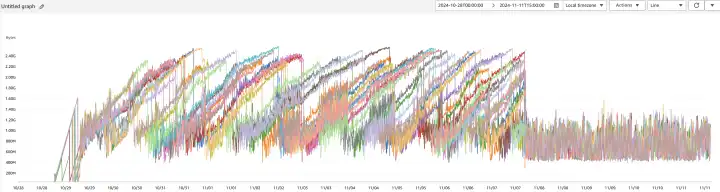

Unlike the previous linear increase, memory usage now remains consistent over time, indicating that the memory leak has been successfully addressed. Additionally, the absence of abrupt memory drops suggests that Tomcat is no longer restarting unexpectedly due to memory exhaustion. The absence of OutOfMemoryError exceptions confirms that the application's memory usage is stable again.
Conclusion
In retrospect, the issue unfolded as follows: a memory leak occurred, but it wasn't noticed by anybody, with only the symptoms of increased memory usage being observed. Someone then made the decision to provide more memory to our backend application by increasing the maximum heap size. Unfortunately, this led to physical memory exhaustion, which masked the memory leak, the true root cause of the problem.
This experience reinforced the importance of proper resource management in Java applications, especially when using thread-local variables like InheritableThreadLocal. It is crucial to release memory promptly when data is no longer needed. Memory leaks can be subtle and challenging to detect without the right tools and a thorough understanding of the application's behavior. Even experienced developers can make such mistakes, highlighting the importance of effective debugging strategies and proactive monitoring.
By analyzing the Java heap dump with MAT, we were able to pinpoint the exact source of the memory leak and implement an effective solution. I hope this deep dive into our debugging process provides valuable insights for others facing similar issues.
Happy coding!